Our available controls: Rainier Blinds offers Roman and woven wood shades with motorized operation only. Available controls and power options for other products are confirmed at your consultation.
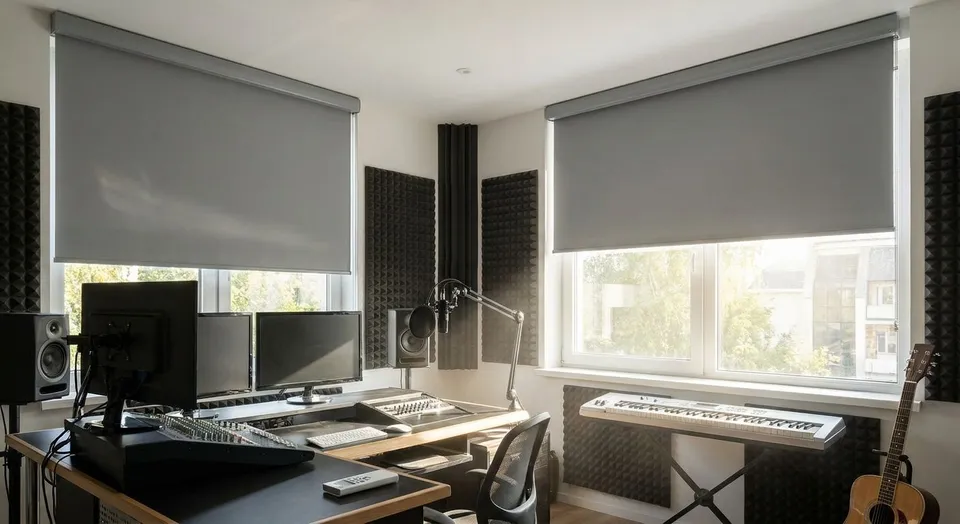
A home recording studio needs dependable light control and controls that are convenient between takes. Select the fabric, edge coverage, motor sound, and maintenance access for the room. Treat acoustic isolation as a separate design task unless the selected product has relevant test data.
- Cellular shades cut reflected noise off glass better than any other option for motorized shades for home recording studios.
- Blackout roller or drapery panels stop light leaks during long tracking sessions without a single cord to catch on a mic stand.
- Program shades to close automatically at session start times so light and sound stay consistent take after take.
- Pair shades with a smart home hub so a voice command or scene button controls the room without breaking focus.
- Rainier Blinds installs and programs motorized cellular, roller, zebra, roman, and drapery options across the Greater Seattle Area, no subcontractors.
Why this matters for home recording studios
A home studio lives or dies on two things: consistent light for video content and controlled acoustics for audio. Hard-mounted blinds with metal slats or wood louvers rattle against the frame when an HVAC vent kicks on or a door closes down the hall, and that rattle shows up on a condenser mic. Cordless manual shades solve the cord-safety problem but still require you to stop a session and walk to the window.
Motorized shades remove both friction points at once. A zebra shade or cellular shade closes on a schedule or a remote press, and the fabric itself, especially cellular honeycomb construction, adds a layer of sound dampening that a bare window or a hard slat product cannot match. That matters more in a converted bedroom or garage studio than in a normal living space, because those rooms usually have less soft furnishing to absorb reflected sound in the first place.
How to set up motorized shades for a home recording studio
Audit your studio's light and sound problems first
Walk the room during the actual time of day you record, not at noon when the light looks fine.
- Note which windows let in direct sun during your typical 9 a.m. to 5 p.m. session block
- Check for glass surfaces that reflect sound back at your mic position
- Listen for existing rattle from blinds, curtain rods, or loose hardware
- Flag any window facing a street, driveway, or shared wall where outside noise leaks in
- Mark skylights separately; they need their own shade solution, not an afterthought
Pick a fabric that blocks light without adding rattle
Blackout fabric comes in several constructions, and not all of them behave the same acoustically.
- Blackout roller shades give a flat, tight seal against the frame with almost no fabric movement
- Cellular (honeycomb) shades trap air in pockets, which adds a modest sound-dampening effect on top of light control
- Blackout-lined drapery softens hard reflections off a large window wall better than any hard shade
- Avoid loosely hanging sheer or light-filtering-only fabric near a mic position; it moves with airflow and can pick up on sensitive condenser mics
- Confirm opacity rating before ordering; light-filtering and blackout are not the same product
Add cellular shades where noise reduction matters most
If your studio sits near a street, a shared wall, or an HVAC return, cellular shades are the one shade type in this lineup built specifically for sound. Rainier Blinds' guide on cellular shades for noise reduction in home offices covers cell size and mount depth in more detail, and the same logic carries over directly to a home studio.
- Choose double-cell over single-cell construction for a denser air pocket
- Select the mount for fit and light coverage; do not assume it provides acoustic isolation
- Combine cellular shades with a blackout liner on the studio's primary window if you also need light control
- Skip aluminum or hard-slat products entirely; they add reflective surfaces that work against you acoustically
Automate blackout timing around recording sessions
Once the right fabric is on the window, automation removes the manual step entirely.
- Set a daily schedule that closes shades 10 minutes before your usual first session
- Build a separate evening schedule if you record late and need blackout for video lighting consistency
- Use a remote scene button labeled "Recording" so a guest engineer or collaborator can trigger the same close without asking
- Test the schedule for a full week before locking it in; light angles shift through the seasons in the Pacific Northwest
Pair shades with a smart home hub for hands-free control
A physical remote works, but a hub-connected system means shades respond to voice or a phone app without you leaving the mic. Rainier Blinds' guide to pairing motorized shades with a smart home hub walks through the setup for the major platforms.
- Confirm your shade motor's radio protocol matches your hub before buying (this is a compatibility question worth asking at consult)
- Group all studio windows into a single "Studio" scene so one command closes everything at once
- Set a mute-friendly command phrase if you use voice control during live streams
- Keep a physical remote as backup in case the hub or Wi-Fi drops mid-session
Maintain motorized shade batteries so power never dies mid-session
A dead battery mid-take is worse than never having motorized shades at all, because now you're improvising a fix on the spot.
- Check battery indicators monthly, not just when a shade stops responding
- Keep a charging schedule outside of active recording windows
- Consider a hardwired power option for the shade closest to your primary mic position if your studio runs sessions daily
- Reference Rainier Blinds' battery maintenance guide for charge-cycle specifics by motor type
Layer shades and drapery for a stronger vocal booth effect
If your studio doubles as a home theater or a dedicated vocal booth, stacking a hard shade with soft drapery adds both blackout depth and acoustic softening in one window.
- Mount a blackout roller or cellular shade closest to the glass for the seal
- Add a blackout-lined drapery panel in front for texture that absorbs sound reflection
- Keep drapery weighted at the hem so it doesn't sway and brush the wall during HVAC cycles
- Match the drapery's opacity to the shade behind it; mismatched layers create light gaps at the edges
Get a studio-ready shade consult
Rainier Blinds measures and installs motorized shades across the Greater Seattle Area.
Comparison: which shade type fits a home recording studio
| Option | Best for | Key limitation |
|---|---|---|
| Blackout roller shades | Fast, flat light seal on a single window | Adds no meaningful sound dampening on its own |
| Cellular (honeycomb) shades | Rooms needing light and temperature control | Costs more per window than a basic roller shade |
| Zebra shades | Studios that shoot video and need adjustable light, not full blackout | Not a true blackout option even at full closure |
| Blackout-lined drapery | Large window walls or a vocal-booth-style layer | Confirm compatible drapery track and motor |
| Roman shades | Smaller studio windows where a tailored look matters | Confirm the selected motor, speed, and load |
Cellular shades win on acoustics; blackout roller shades win on speed and seal. For most home recording studios in 2026, the right answer is one of those two, layered with drapery only if the window is oversized.
Common mistakes home studio owners make
- Buying light-filtering fabric when the studio needs blackout. The two look similar in a showroom but perform completely differently once a camera light or a mid-day sun angle hits the window.
- Mounting shades outside the frame to save on measuring. That extra gap is exactly where outside sound leaks through, undermining the whole point of switching to cellular shades.
- Skipping the automation schedule and relying on manual remote presses. Every manual step is a moment you have to stop and restart a take.
- Ignoring skylights entirely. A studio with a skylight and a perfectly blacked-out window wall still gets blown out on camera from above.
- Choosing a shade motor before checking smart hub compatibility. Retrofitting a mismatched motor after installation costs more than confirming it up front at the consult.
FAQ
What's the best motorized shade for a home recording studio?
Cellular shades are the best motorized shade option for a home recording studio because the honeycomb construction adds sound dampening in addition to light control. Blackout roller shades are the faster, simpler choice if acoustics are already handled by other room treatment.
Do motorized shades actually reduce noise in a studio?
Do not rely on ordinary shades to soundproof a room or reduce traffic noise by a specified amount. Acoustic performance needs test data for the selected product and installation; discuss dedicated acoustic treatment if noise control is a priority.
Is blackout better than light-filtering for a recording studio?
Blackout fabric is better than light-filtering fabric for any studio that also records video, since light-filtering still lets enough light through to shift exposure during a session. Light-filtering works only if the studio is audio-only and light control isn't a concern.
How much does it cost to add motorized shades to a home studio?
Cost depends on window count, size, and fabric choice, and pricing is best confirmed directly with a consult since it varies by project. Rainier Blinds provides on-the-spot pricing during an in-home measure in the Greater Seattle Area.
Can motorized shades be programmed to close automatically before a session?
Yes, most motorized shade systems support scheduled closing at a set time each day. Rainier Blinds' guide on programming motorized window shades covers setting up daily schedules by motor brand.
Do I need a smart home hub to control studio shades by voice?
Yes, a smart home hub is required to control shades by voice command or group them into a single scene. Without a hub, most motorized shades still work with a physical remote or a manufacturer app alone.
Are zebra shades good enough for full blackout in a studio?
No, zebra shades are not a true blackout product even fully closed, since the dual-layer fabric design leaves some light transmission by design. Use a blackout roller shade or blackout-lined drapery instead if full blackout is the requirement.
What happens if a motorized shade's battery dies during a session?
A dead battery leaves the shade stuck in its last position until recharged or manually overridden, depending on the motor. Checking battery indicators monthly and keeping a charging routine outside session hours prevents this from happening mid-recording.
One last thing
The detail most home studio owners miss isn't the shade fabric at all, it's mount depth. A shade mounted with even a quarter-inch gap between the fabric edge and the window frame leaks both light and sound, and that gap is invisible until you're three tracks into a session wondering why the room tone changed. Get the measure right before the motor matters.